
Are you wondering when I should use the fan setting on my thermostat? Knowing when and how to use your HVAC system’s thermostat fan can be a bit confusing; we get it!
Here at Top Shelf Heating and Cooling, we specialize in HVAC services throughout the Treasure Valley of Idaho, and we also enjoy helping our customers learn how to use their systems properly and efficiently.
In this article, we will teach you how to use your fan to get the most out of your HVAC system while also saving on energy bills!
5 Quick Tips: When to Use the Fan Setting on Your Thermostat
Here are the Top Shelf fast five tips for your thermostat fan settings to keep it simple!
- Use AUTO for everyday comfort and energy savings – the fan only runs when heating or cooling is needed.
- Switch to ON for cleaner air and consistent temperatures – ideal during allergy season or when rooms feel uneven.
- Try CIRCULATE if your thermostat offers it – runs the fan intermittently for balanced airflow with lower power use.
- Use AUTO during humid months – helps remove moisture and prevent clammy air.
- Switch to ON when hosting or cleaning – keeps air fresh and evenly distributed throughout your home.
Understanding Fan Modes for Energy Efficiency in the Treasure Valley
If you’ve ever stared at your thermostat wondering what that little FAN switch actually does, you’re not alone. Most homeowners either leave it on AUTO forever or flip it on, hoping it’ll “freshen the air.”
The truth is, your fan setting can make a real difference in comfort, efficiency, and air quality—especially here in Idaho’s climat,e where we bounce from hot, dry summers to cold winters.
What Are the Different Fan Settings on a Thermostat and How Do They Work?
Every thermostat controls the blower fan inside your HVAC system—the part that actually moves air through your ducts. The fan has three main settings: AUTO, ON, and sometimes CIRCULATE (on newer smart thermostats).
| Mode | Operation | Primary Benefit |
|---|---|---|
| AUTO | Runs only during heating or cooling cycles | Optimizes energy efficiency |
| ON | Runs continuously | Improves filtration and circulation |
| CIRCULATE | Runs at intervals (usually 20 minutes/hour) | Balances comfort with lower energy use |
Each mode affects how often your blower runs, how your home feels, and how much power you use. Let’s break them down.
What Does the AUTO Fan Setting Do?
Have you ever been in a room that felt stuffy, even when it was cool outside? Most likely, there is no auto fan setting on.
AUTO mode is the “set it and forget it” option—but it’s smarter than most people realize. In this mode, the blower runs only when your furnace or air conditioner is actively heating or cooling. Once the thermostat hits your set temperature, everything shuts off until the next cycle.
Here’s why that matters:
- Better humidity control: When the fan stops between cooling cycles, condensation on your evaporator coil drains properly instead of being blown back into your home. That keeps humidity in check—especially helpful during muggy Idaho summers.
- Energy savings: The blower motor is one of the biggest energy consumers in your system. AUTO mode reduces run time, which means lower electric bills.
- Less wear and tear: Fewer hours on the motor means a longer lifespan for your system.
AUTO mode is perfect for most Nampa homes that want steady comfort without unnecessary runtime or humidity issues.
How Does the ON Fan Setting Operate Continuously?

Switching the thermostat fan to ON tells your system to run the blower nonstop—no matter if it’s heating, cooling, or resting. It sounds inefficient, but it has its perks.
Here’s what ON mode offers:
- More consistent comfort: Continuous airflow helps even out temperature differences between rooms and floors.
- Cleaner air: Since air constantly passes through your filter, dust, dander, and pollen get trapped more frequently.
- System balance: Continuous circulation maintains stable air pressure and can improve duct performance.
Potential downside: the fan draws power 24/7, so energy use can rise 10–15%. Plus, during humid months, moisture on your cooling coil can re-evaporate, making air feel a bit sticky.
Use ON mode when air quality or circulation matters most—for example, during allergy season, when you’re running an air purifier, or if some rooms in your home run hotter or colder than others.
What Is the CIRCULATE Fan Setting and When Is It Available?
If AUTO and ON are opposites, CIRCULATE is the middle ground. Found on newer programmable and smart thermostats, this mode runs the fan intermittently—usually about 20 minutes every hour—even when heating or cooling isn’t needed.
Why it’s a favorite for Idaho homeowners:
- Balanced comfort: Keeps air fresh without the constant hum of a running fan.
- Energy moderation: Uses roughly 60–70% less electricity than ON mode.
- Improved air distribution: Reduces stagnant air and lingering odors, keeping your home feeling fresher year-round.
If your thermostat supports CIRCULATE, it’s an ideal compromise between comfort and energy efficiency.
When Should I Use the AUTO Fan Setting for Energy Savings and System Longevity?
AUTO mode is your best bet for saving money and protecting your HVAC system over time. Because the fan only runs during heating or cooling cycles, it uses far less energy than a fan that runs constantly.
Use AUTO mode when:
- Temperatures outside are moderate (spring and fall).
- You want to reduce monthly utility bills.
- Humidity control is a priority during the cooling season.
Limiting unnecessary blower run time helps reduce wear on motor bearings and electrical components—keeping your system running smoothly for years longer.
How Does AUTO Mode Save Energy and Reduce Utility Bills?
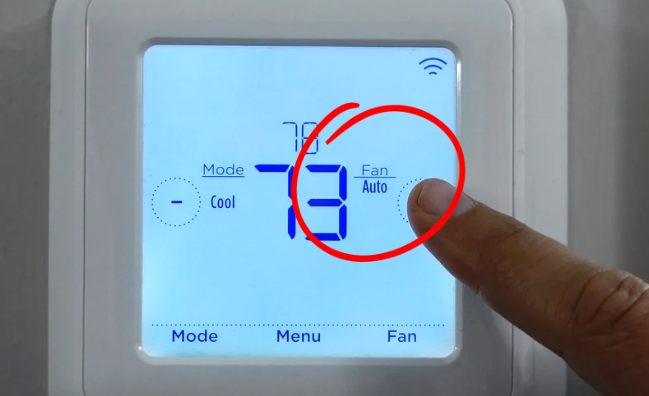
AUTO mode keeps your HVAC fan from running unless it’s actually needed. That simple change can cut fan-related energy use by up to 50%, depending on your system and home size. Since the fan shuts off when your home reaches the set temperature, you’re not wasting power circulating already-conditioned air.
Over time, especially in Nampa’s hot summers or cold winters, that adds up to noticeable savings on your Idaho Power bill.
How Does AUTO Mode Protect the HVAC System and Extend Lifespan?
Because AUTO mode limits blower runtime, it reduces strain on moving parts and heat buildup inside the motor. That translates into fewer breakdowns and longer service life for components like bearings, belts, and control boards.
If you’ve ever dealt with a noisy blower motor or frequent fan replacements, using AUTO more often can make a real difference.
Pros of ON Fan Setting for Improved Air Quality:
Humans spend 90% of their time indoors, and that means you need great indoor air quality.
Running the fan continuously can make your air feel cleaner and temperatures more consistent. Every pass through the filter captures more dust and pollen, helping families with allergies or pets breathe easier.
Use ON mode when:
- You’re hosting guests or have higher household activity.
- Allergy season hits and you want constant filtration.
- Your home has rooms that struggle with uneven temperatures.
The key is balance—running it 24/7 may increase bills slightly, so consider switching back to AUTO when you’re not home.
What Are the Energy and Maintenance Considerations of Using ON Mode?
Because the fan never rests, you’ll use more electricity—typically around 10–15% more per month. You’ll also need to replace filters more often, since air is constantly moving through them. Neglecting filter changes can overwork the fan motor and reduce efficiency.
If you prefer ON mode for comfort, try a high-efficiency air filter and mark monthly reminders to replace it.
How Do Smart Thermostats Enhance Fan Setting Control and Efficiency?

Smart thermostats like Nest, Ecobee, and Trane ComfortLink give you precision control over when and how your fan runs. These systems learn your habits, track humidity, and automatically switch between AUTO and CIRCULATE to optimize energy use.
Smart features include:
- Custom fan schedules based on occupancy.
- Geofencing that turns the fan on when you’re home.
- Adaptive algorithms that adjust to Idaho’s temperature swings automatically.
With a smart thermostat, your fan works only when it’s needed—helping your system breathe easier and your wallet stay happier.
How Does Proper Fan Setting Choice Connect to HVAC Maintenance and Home Services?
Fan settings aren’t just about comfort—they directly affect your HVAC system’s performance. Here’s how they tie into professional maintenance and service:
| Service | Relevance to Fan Settings | Customer Benefit |
|---|---|---|
| HVAC Maintenance | Verifies blower motor health & calibration | Improves efficiency and reliability |
| Thermostat Installation | Ensures accurate fan control & settings | Delivers precise comfort & automation |
| Duct Cleaning | Removes buildup that restricts airflow | Boosts air circulation & indoor air quality |
Routine service ensures your blower motor runs smoothly, filters aren’t overloaded, and your thermostat responds properly to fan commands.
Why Regular HVAC Maintenance Matters for Fan Settings
Your thermostat settings can only do so much if your system isn’t clean or tuned up. During a Top Shelf tune-up, our team inspects:
- Blower motor balance and performance
- Filter condition and airflow restriction
- Electrical connections and control board settings
- Thermostat calibration and fan response
Keeping everything clean and calibrated ensures your fan settings work exactly as designed—saving energy and keeping air fresh throughout your home.
How Can Professional Thermostat Installation Improve Fan Setting Performance?
Thermostats are the “brains” of your system. If they’re installed incorrectly or in poor locations (like near windows or vents), your fan settings won’t behave as expected. We always recommend installing a smart Wi-Fi-enabled thermostat not only to save on energy bills, but also to track everything HVAC-related from the comfort of an app on your phone.
However, sometimes installing a new thermostat and customizing the fan settings can be a bit of a burden. We offer professional thermostat installation, which ensures:
- Accurate wiring for proper fan operation.
- Correct placement away from heat sources or drafts.
- Updated software for innovative features and scheduling.
- Customized programming to fit your family’s schedule and comfort preferences.
It’s one of the simplest upgrades that can instantly improve both comfort and efficiency.
When Should Homeowners Schedule Duct Cleaning Related to Fan Usage?
The cleanliness of your HVAC ventilation system and ductwork can affect your system, air quality, and comfort.
If you’ve been using your fan more frequently—especially in ON or CIRCULATE modes—consider having the ducts cleaned every 1–2 years. Continuous airflow stirs up dust and pet dander that can accumulate in your ducts over time.
Clean ducts reduce strain on your fan motor, improve airflow, and help your filters last longer.
Final Word on Thermostat Fans
Even small settings make a big difference in how your home feels—and how much you spend each month. Your thermostat’s fan mode isn’t just a button; it’s a tool that helps you control energy use, comfort, and air quality.
Whether you’re in Nampa, Meridian, or Boise, our team at Top Shelf Heating & Cooling can help you dial in the right balance for your home. A quick tune-up or thermostat upgrade can turn uneven air and high energy bills into steady comfort year-round.
GET IN TOUCH WITH TOP SHELF

 Fall Heater Tune-up in the Treasure Valley: Ensure Safe, Efficient, and Reliable Home Heating